Read the PDF. Go deeper without leaving it.

Turn passages into
maps of understanding.

Lensmap is not a full-document AI autopilot. Start from the passage you are actually reading, expand only the context you need, and keep what you learn as Maps that lead back to the source.

Keep using Chrome’s built-in PDF Viewer.

PMBOK analyzed with LensmapSelect a passage → Ask → Keep the Map
01 · HIGHLIGHT · PDF p.20Selected

PMBOK 7 principles · Focus on value

Focus on value

A project is forecast to finish two months late before a fixed event date.

Lower quality to the minimum acceptable level — or spend more to add resources and deliver on time.

Which choice is right depends on why the project exists and how it creates value.

02 · ASK

How does this choice change depending on the purpose of the project?

S1 · PDF p.20Expand only what is needed
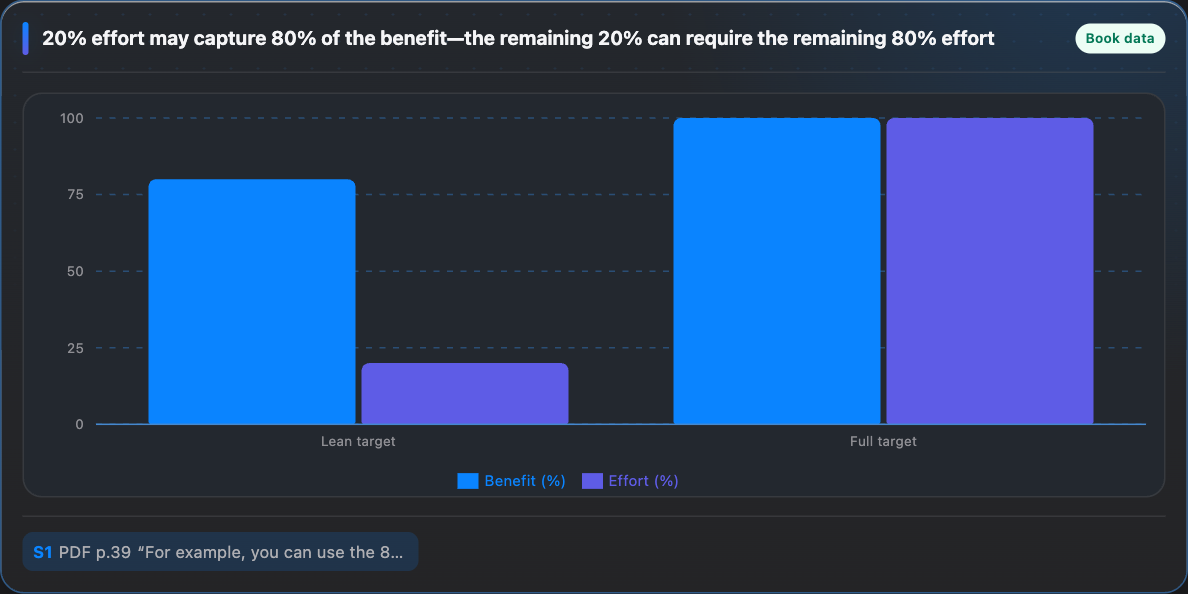
PMBOK · MethodologiesComparison
PMBOK · Risk choiceChart
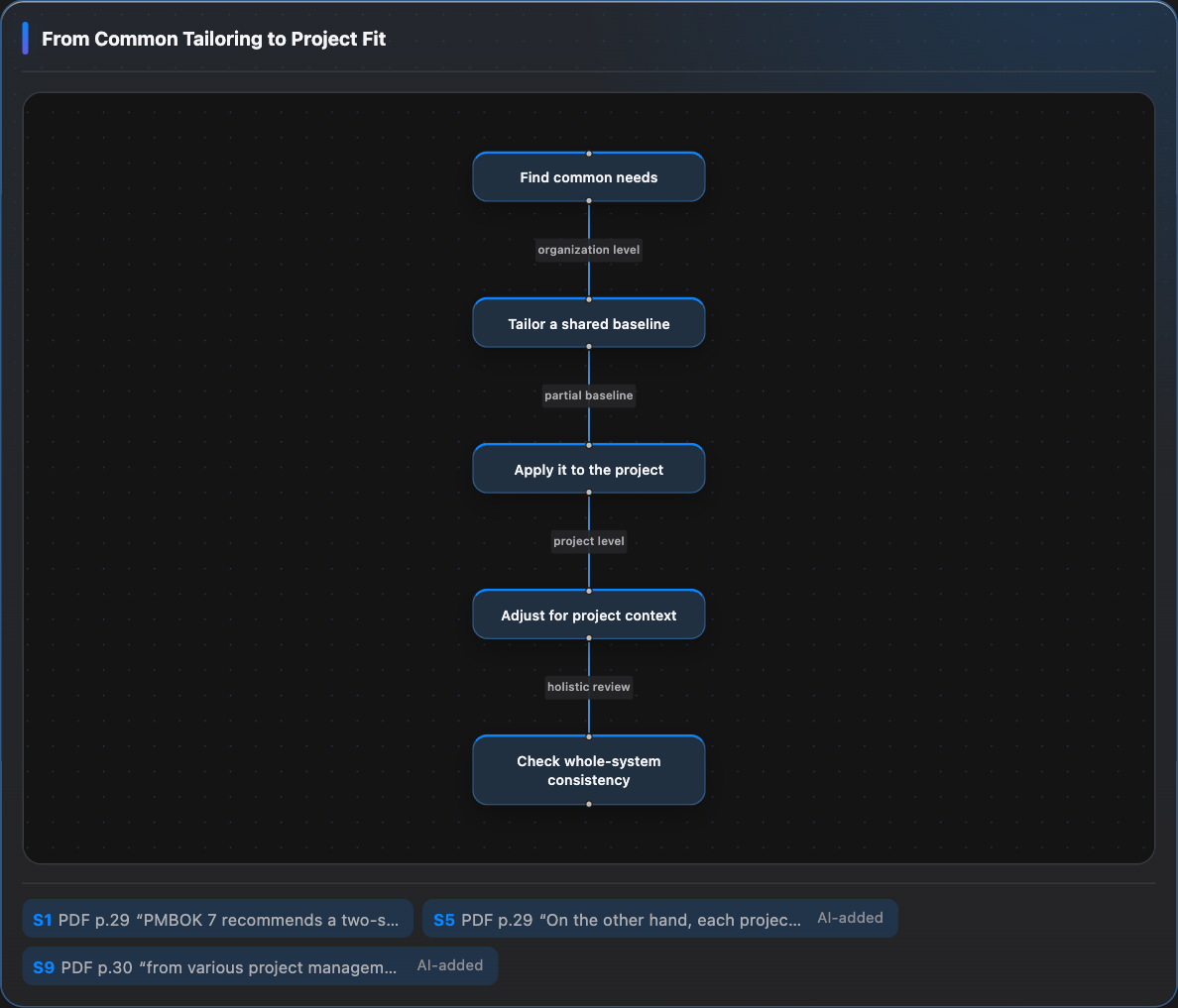
03 · MAP · Tailoringselection + needed references

All of these were generated by the current Lensmap from the same public PMBOK PDF. The Map changes shape—definition, table, comparison, flow, and more—based on the question.

See all 9 PMBOK examples →

Focus → Expand → Map

You stay in control of the reading.

  1. 01

    Focus

    You choose what deserves attention. Start from a passage or visual region instead of asking AI to read the whole document for you.

  2. 02

    Expand

    When the selection is not enough, Lensmap can read nearby blocks, the same section, or related passages—and records what it added.

  3. 03

    Map

    What you learn is retained automatically as a Map: diagrams, tables, comparisons, concise explanations, and references in the form that fits the idea.

Chat is the scratchpad. The Map is the outcome.

Come back later and still know why it made sense.

The point is not to make chat logs look prettier. A Map keeps how reading became understanding. The examples below were generated by the current Lensmap Map Composer from a real public CC BY project-management PDF.

PMBOK ANALYZED WITH LENSMAP

Lower quality or spend more? The project purpose changes the answer.

Start from a passage about a two-month delay and ask what should determine the trade-off. Lensmap reads the nearby Why / Value / Business case context only as needed, then maps how the meaning of each option changes with project purpose.

1
passage selected by the reader
+1
additional context read by AI
2
References retained in the Map
Actual Lensmap causal Map relating project purpose, value, quality, and cost
Actual Lensmap Map detail. The selected passage and the additional passages read for the answer remain available as source references.Swipe to inspect the actual Map →

SAME PMBOK, DIFFERENT QUESTION

Change the question, and the Map changes shape.

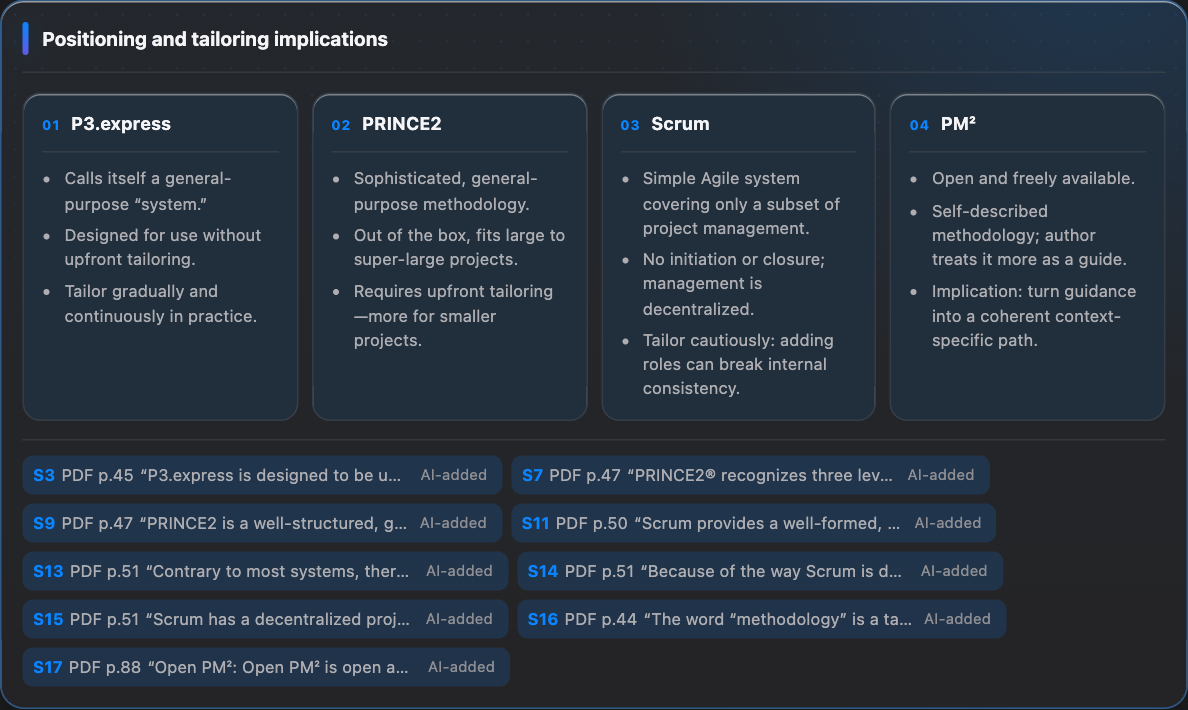
Selecting four passages on P3.express, PRINCE2, Scrum, and PM² and asking how the book positions them produced a four-column Comparison Map. Lensmap does not force every insight into one diagram type.

Actual Lensmap Comparison Map for P3.express, PRINCE2, Scrum, and PM²
Another real Map: four referenced passages are organized into a four-way comparison.
ExamplesNine Map patterns, generated from the same PMBOK PDF.View all →

Example source: Nader K. Rad, PMBOK® Guide 7, Underneath the Surface — CC BY. The Map is a Lensmap-generated summary and structure. The book reflects the author’s personal views, not PMI’s. PMBOK® is a registered mark of Project Management Institute, Inc.

Keep the references

Lensmap distinguishes what you selected from context added by AI. Citations lead back to the original PDF, so the explanation never becomes detached from its source.

Local-first

PDFs, indexes, Explore threads, and Maps stay local by default. Only the question and the references needed to answer it are sent to AI.

ChatGPT subscription

No API key. Use Codex within your ChatGPT subscription.

There is no separate API key or metered API bill to configure. Lensmap uses Codex authenticated through ChatGPT and sends only the references needed for the current Reader Workspace. Usage stays within the Codex allowance included in your ChatGPT plan.

ChromeLensmap Side PanelFocus / Explore / Maps
LocalLensmap ServerPDF index · references · retrieval
AI runtimeCodex App ServerAuthenticated Codex session
  • Uses Codex authenticated through the ChatGPT Mac app or Codex CLI
  • Shows model selection, Context usage, and usage windows in the Side Panel
  • Sends the actual image to an image-capable model for Visual Sources

Open source · Apache-2.0

Try the current build from GitHub.

Development setup lives in the README. This page keeps the installation section to a single entry point instead of repeating the steps.

FAQ

Frequently asked questions

Is Lensmap an AI chat app?

Chat is a supporting tool. You decide what to read; chat acts like a scratchpad for organizing understanding. The durable outcome is a Map with source references and links back to the PDF.

Does Lensmap upload the entire PDF to AI?

The design is local-first. PDFs and indexes remain local, while Codex receives the references needed for the current question plus constrained additional context when required.

Which AI does it use?

Lensmap uses Codex authenticated through ChatGPT. No separate API key is required; usage is within the Codex allowance included in your ChatGPT plan.

Does it replace Chrome’s PDF Viewer?

No. Chrome’s built-in PDF Viewer remains the reading surface and Lensmap sits beside it in the Side Panel.

Can it read local PDFs?

Yes. Enable “Allow access to file URLs” in the Lensmap extension details in Chrome.

What platforms are supported?

The current packaged target is macOS Apple Silicon with Google Chrome 141 or later.